Column Visibility Toggle
Customize which data columns are visible in the data grid to focus on specific bodies or metrics of interest, without needing to regenerate the ephemeris.
Toggling Column Visibility
- Right-click on any column header in the data grid
- A context menu appears listing all columns with checkboxes
- Check or uncheck a checkbox to show or hide the corresponding column
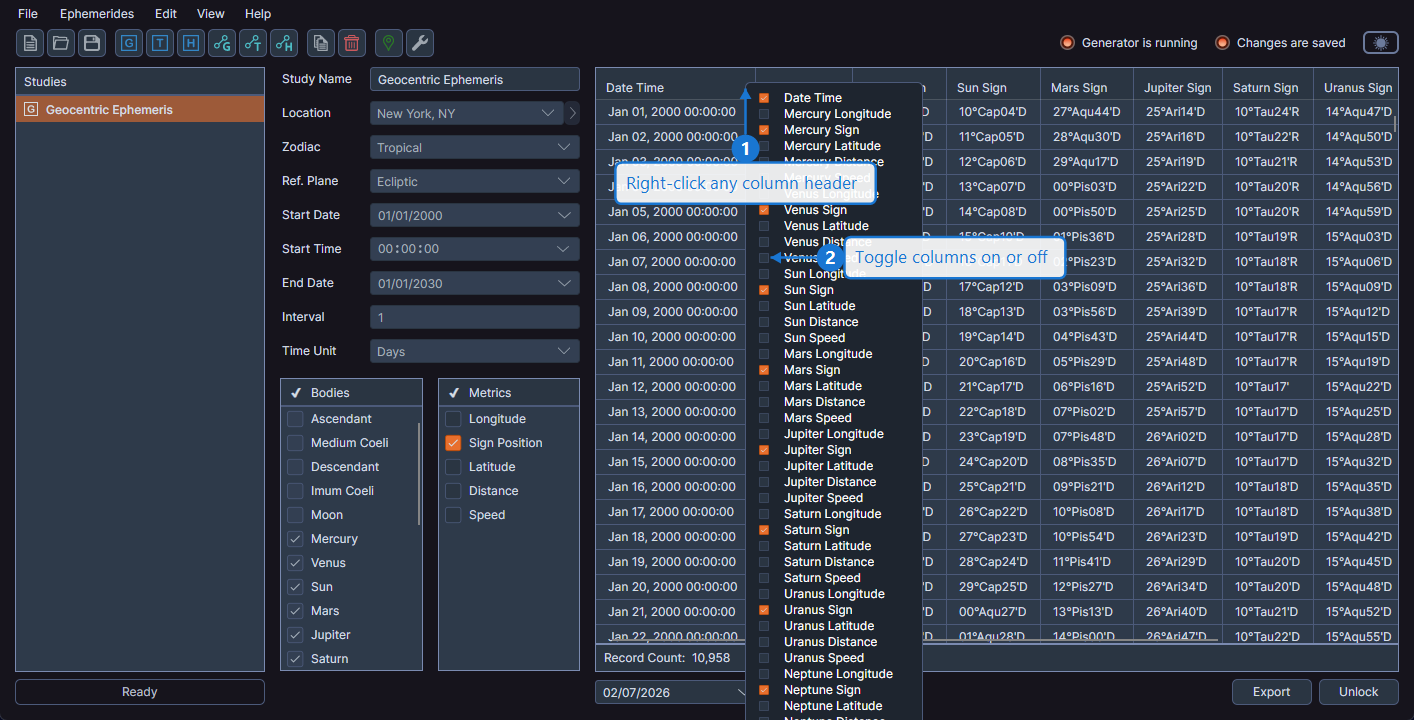
The context menu stays open after each toggle, allowing you to show or hide multiple columns without reopening the menu. Click outside the menu to close it when finished.
Relationship to Metric Selection
The ephemeris metric selection you make before generating determines which columns are initially visible. However, Cygnus always calculates all metrics regardless of your pre-generation selection. After generation, you can use the column visibility toggle to show any column, including those that were not initially selected.
Persistence
Column visibility settings are saved with the study in the workspace file. When you reopen a workspace, each study's data grid retains the column visibility configuration you set.