Default Settings Editor
The Default Settings Editor lets you pre-configure common settings so that new studies start with your preferred values instead of generic defaults. This saves time when you consistently use the same location, zodiac system, or date range.
Opening the Editor
You can open the Default Settings Editor in either of these ways:
- Click the Default Settings button on the toolbar
- Select Edit > Default Settings from the menu
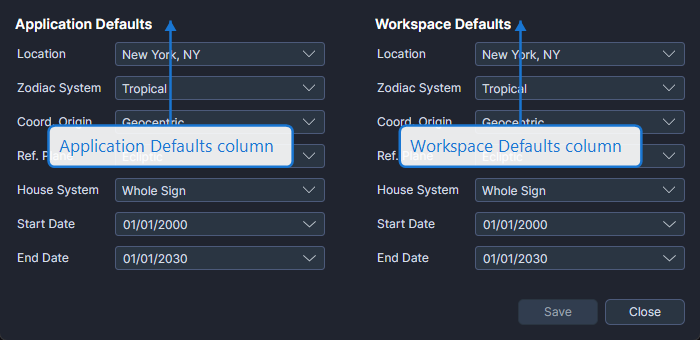
Two Levels of Defaults
The editor displays two columns side by side:
Application Defaults (Left Column)
Application defaults persist globally across all workspaces and sessions. Any new study in any workspace uses these defaults as the starting values.
Workspace Defaults (Right Column)
Workspace defaults apply only to the current workspace and are saved with the workspace file. When set, workspace defaults override application defaults for studies created in that workspace.
Configurable Settings
Both columns offer the same configurable fields:
| Setting | Description |
|---|---|
| Location | Default geographic location |
| Zodiac System | Default zodiac framework (Tropical or Sidereal) |
| Coord. Origin | Default coordinate origin (Geocentric, Topocentric, or Heliocentric) |
| Ref. Plane | Default reference plane (Ecliptic or Equatorial) |
| House System | Default house system |
| Start Date | Default start date for new studies |
| End Date | Default end date for new studies |
Saving and Closing
- Click Save to persist your changes
- Click Close to dismiss the editor
If you have unsaved changes when you click Close, Cygnus prompts you to save before closing.
Set your most commonly used location and zodiac system as application defaults to avoid configuring them for every new study. Use workspace defaults when a specific workspace requires different settings.