Ephemeris Presets
Ephemeris presets save common study-level configuration settings for quick reuse. Instead of manually configuring the same location, zodiac system, and reference plane for every new study, you can apply a preset with a single click.
What Presets Capture
An ephemeris preset stores the following settings:
- Location
- Zodiac System (Tropical or Sidereal)
- Coordinate Origin (Geocentric, Topocentric, or Heliocentric)
- Reference Plane (Ecliptic or Equatorial)
Accessing Ephemeris Presets
Click the Presets Menu Button (the small icon next to the Location dropdown) to open the presets flyout menu.
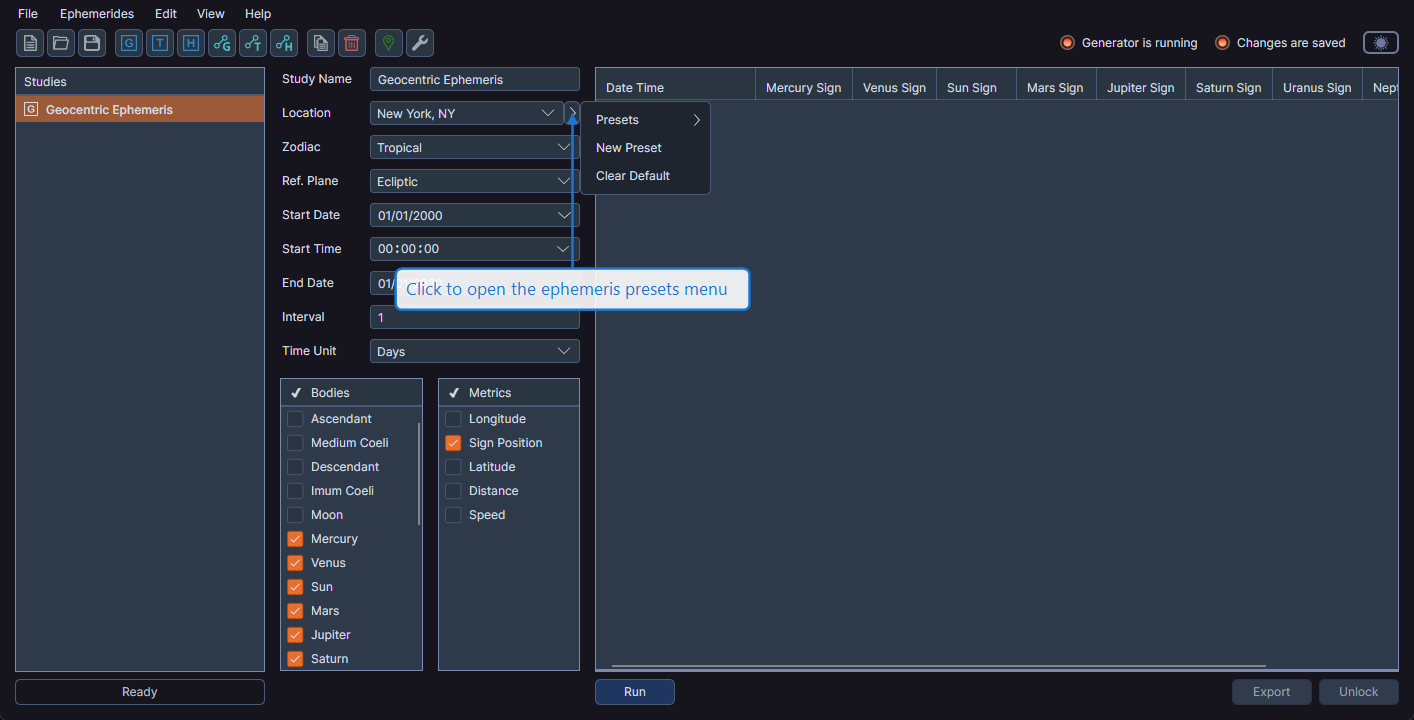
Preset Operations
Create a New Preset
- Configure the study with your desired settings
- Click the Presets Menu Button
- Select New Preset
- Enter a name for the preset
The preset captures the current configuration values.
Apply a Preset
- Click the Presets Menu Button
- Select Presets
- Select the preset you want to apply
The study's configuration fields update to match the preset's saved values.
Set a Default Preset
- Click the Presets Menu Button
- Select the preset you want to use as the default
- Click Set Default
New studies of the same type automatically use the default preset's values for their initial configuration.
Additional Operations
- Rename -- Change the name of an existing preset
- Replace -- Update a preset's saved values with the current study configuration
- Clear Default -- Remove the default preset designation so new studies use standard defaults
- Delete -- Permanently remove a preset
info
Ephemeris presets are shared across all workspaces. Presets you create are available in any workspace you open.